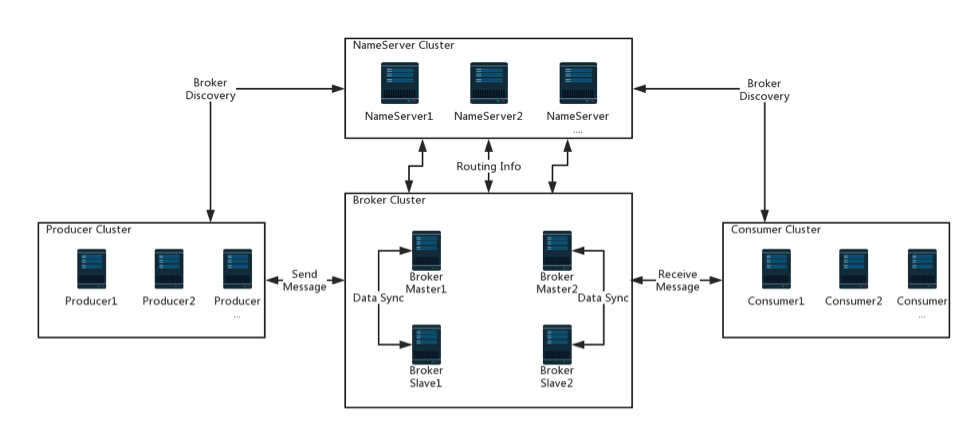
RocketMQ中间件指南

1. RocketMQ概述

“根据我们的研究,随着使用的队列和虚拟主题的增加,ActiveMQ IO模块成为瓶颈。我们尽力通过节流,断路器或降级解决这个问题,但效果不佳。因此,我们开始关注当时流行的消息传递解决方案Kafka。不幸的是,Kafka无法满足我们的要求,特别是在低延迟和高可靠性方面,详见 http://rocketmq.apache.org/rocketmq/how-to-support-more-queues-in-rocketmq/

arc

RocketMQ有三种方式发送消息:可靠的同步(reliable synchronous),可靠的异步(reliable asynchronous)和单向传输(one-way transmission)。

1.1 同步发送producer.send

可靠的同步传输用于广泛的场景,如重要的通知消息,短信通知,短信营销系统等。

发送消息:

1
2
3
4
5
6
7
8
9
10
11
12
DefaultMQProducer producer = new DefaultMQProducer("please_rename_unique_group_name");
producer.setNamesrvAddr("localhost:9876");
producer.start();
for (int i = 0; i < 100; i++) {
//Create a message instance, specifying topic, tag and message body.
Message msg = new Message("TopicTest","TagA",("Hello RocketMQ " +i).getBytes(RemotingHelper.DEFAULT_CHARSET));

//Call send message to deliver message to one of brokers.
SendResult sendResult = producer.send(msg);
System.out.printf("%s%n", sendResult);
}
producer.shutdown();

接收消息:

1
2
3
4
5
6
7
8
9
10
11
12
13
14
DefaultMQPushConsumer consumer = new DefaultMQPushConsumer("please_rename_unique_group_name");
consumer.setNamesrvAddr("localhost:9876");
consumer.subscribe("TopicTest", "*");

consumer.registerMessageListener(new MessageListenerConcurrently() {

@Override
public ConsumeConcurrentlyStatus consumeMessage(List<MessageExt> msgs,ConsumeConcurrentlyContext context) {
System.out.printf("%s Receive New Messages: %s %n", Thread.currentThread().getName(), msgs);
return ConsumeConcurrentlyStatus.CONSUME_SUCCESS;
}
});

consumer.start();

1.2 异步发送producer.send(msg, new SendCallback())

异步传输通常用于响应时间敏感的业务场景。

1
2
3
4
5
6
7
8
9
10
11
12
13
14
15
16
17
18
19
20
21
22
23
DefaultMQProducer producer = new DefaultMQProducer("please_rename_unique_group_name");
producer.setNamesrvAddr("localhost:9876");
producer.start();
producer.setRetryTimesWhenSendAsyncFailed(0);
for (int i = 0; i < 100; i++) {
final int index = i;
//Create a message instance, specifying topic, tag and message body.
Message msg = new Message("TopicTest","TagA","OrderID188","Hello world".getBytes(RemotingHelper.DEFAULT_CHARSET));

producer.send(msg, new SendCallback() {
@Override
public void onSuccess(SendResult sendResult) {
System.out.printf("%-10d OK %s %n", index,
sendResult.getMsgId());
}
@Override
public void onException(Throwable e) {
System.out.printf("%-10d Exception %s %n", index, e);
e.printStackTrace();
}
});
}
producer.shutdown();

1.3 单向发送producer.sendOneway

单向传输用于需要中等可靠性的情况,例如日志收集。

1
2
3
4
5
6
7
8
9
10
11
DefaultMQProducer producer = new DefaultMQProducer("please_rename_unique_group_name");
producer.setNamesrvAddr("localhost:9876");
producer.start();
for (int i = 0; i < 100; i++) {
//Create a message instance, specifying topic, tag and message body.
Message msg = new Message("TopicTest","TagA",("Hello RocketMQ " +i).getBytes(RemotingHelper.DEFAULT_CHARSET));

//Call send message to deliver message to one of brokers.
producer.sendOneway(msg);
}
producer.shutdown();

1.4 分区发送producer.send(msg, new MessageQueueSelector())

发送消息:

1
2
3
4
5
6
7
8
9
10
11
12
13
14
15
16
17
18
19
20
MQProducer producer = new DefaultMQProducer("example_group_name");
producer.start();
String[] tags = new String[] {"TagA", "TagB", "TagC", "TagD", "TagE"};
for (int i = 0; i < 100; i++) {
int orderId = i % 10;
//Create a message instance, specifying topic, tag and message body.
Message msg = new Message("TopicTestjjj", tags[i % tags.length], "KEY" + i,("Hello RocketMQ " + i).getBytes(RemotingHelper.DEFAULT_CHARSET));

SendResult sendResult = producer.send(msg, new MessageQueueSelector() {
@Override
public MessageQueue select(List<MessageQueue> mqs, Message msg, Object arg) {
Integer id = (Integer) arg;
int index = id % mqs.size();
return mqs.get(index);
}
}, orderId);

System.out.printf("%s%n", sendResult);
}
producer.shutdown();

接收消息:

1
2
3
4
5
6
7
8
9
10
11
12
13
14
15
16
17
18
19
20
21
22
23
24
25
26
27
28
29
DefaultMQPushConsumer consumer = new DefaultMQPushConsumer("example_group_name");
consumer.setConsumeFromWhere(ConsumeFromWhere.CONSUME_FROM_FIRST_OFFSET);
consumer.subscribe("TopicTest", "TagA || TagC || TagD");

consumer.registerMessageListener(new MessageListenerOrderly() {

AtomicLong consumeTimes = new AtomicLong(0);
@Override
public ConsumeOrderlyStatus consumeMessage(List<MessageExt> msgs,ConsumeOrderlyContext context) {
context.setAutoCommit(false);
System.out.printf(Thread.currentThread().getName() + " Receive New Messages: " + msgs + "%n");

this.consumeTimes.incrementAndGet();
if ((this.consumeTimes.get() % 2) == 0) {
return ConsumeOrderlyStatus.SUCCESS;
} else if ((this.consumeTimes.get() % 3) == 0) {
return ConsumeOrderlyStatus.ROLLBACK;
} else if ((this.consumeTimes.get() % 4) == 0) {
return ConsumeOrderlyStatus.COMMIT;
} else if ((this.consumeTimes.get() % 5) == 0) {
context.setSuspendCurrentQueueTimeMillis(3000);
return ConsumeOrderlyStatus.SUSPEND_CURRENT_QUEUE_A_MOMENT;
}
return ConsumeOrderlyStatus.SUCCESS;
}
});

consumer.start();
System.out.printf("Consumer Started.%n");

1.5 广播消费consumer.setMessageModel

发送消息:

1
2
3
4
5
6
7
8
9
DefaultMQProducer producer = new DefaultMQProducer("ProducerGroupName");
producer.start();

for (int i = 0; i < 100; i++){
Message msg = new Message("TopicTest","TagA","OrderID188","Hello world".getBytes(RemotingHelper.DEFAULT_CHARSET));
SendResult sendResult = producer.send(msg);
System.out.printf("%s%n", sendResult);
}
producer.shutdown();

接收消息:

1
2
3
4
5
6
7
8
9
10
11
12
13
14
15
16
17
18
19
DefaultMQPushConsumer consumer = new DefaultMQPushConsumer("example_group_name");
consumer.setConsumeFromWhere(ConsumeFromWhere.CONSUME_FROM_FIRST_OFFSET);

//set to broadcast mode
consumer.setMessageModel(MessageModel.BROADCASTING);
consumer.subscribe("TopicTest", "TagA || TagC || TagD");

consumer.registerMessageListener(new MessageListenerConcurrently() {

@Override
public ConsumeConcurrentlyStatus consumeMessage(List<MessageExt> msgs,
ConsumeConcurrentlyContext context) {
System.out.printf(Thread.currentThread().getName() + " Receive New Messages: " + msgs + "%n");
return ConsumeConcurrentlyStatus.CONSUME_SUCCESS;
}
});

consumer.start();
System.out.printf("Broadcast Consumer Started.%n");

1.6 延迟发送message.setDelayTimeLevel

发送消息:

1
2
3
4
5
6
7
8
9
10
11
12
13
DefaultMQProducer producer = new DefaultMQProducer("ExampleProducerGroup");
producer.start();

int totalMessagesToSend = 100;
for (int i = 0; i < totalMessagesToSend; i++) {
Message message = new Message("TestTopic", ("Hello scheduled message " + i).getBytes());

// This message will be delivered to consumer 10 seconds later.
message.setDelayTimeLevel(3);
producer.send(message);
}

producer.shutdown();

接收消息:

1
2
3
4
5
6
7
8
9
10
11
12
13
14
15
16
17
18
DefaultMQPushConsumer consumer = new DefaultMQPushConsumer("ExampleConsumer");
// Subscribe topics
consumer.subscribe("TestTopic", "*");

// Register message listener
consumer.registerMessageListener(new MessageListenerConcurrently() {
@Override
public ConsumeConcurrentlyStatus consumeMessage(List<MessageExt> messages, ConsumeConcurrentlyContext context) {
for (MessageExt message : messages) {
// Print approximate delay time period
System.out.println("Receive message[msgId=" + message.getMsgId() + "] "
+ (System.currentTimeMillis() - message.getStoreTimestamp()) + "ms later");
}
return ConsumeConcurrentlyStatus.CONSUME_SUCCESS;
}
});

consumer.start();

1.7 批量发送producer.send(new ArrayList<>())

1
2
3
4
5
6
7
8
9
10
11
String topic = "BatchTest";
List<Message> messages = new ArrayList<>();
messages.add(new Message(topic, "TagA", "OrderID001", "Hello world 0".getBytes()));
messages.add(new Message(topic, "TagA", "OrderID002", "Hello world 1".getBytes()));
messages.add(new Message(topic, "TagA", "OrderID003", "Hello world 2".getBytes()));
try {
producer.send(messages);
} catch (Exception e) {
e.printStackTrace();
//handle the error
}

只有在发送大批量时,复杂性才会增加,您可能不确定它是否超出了大小限制(1MiB)。

1.8 消费过滤MessageSelector.bySql

发送消息:

1
2
3
4
5
6
7
8
9
10
DefaultMQProducer producer = new DefaultMQProducer("please_rename_unique_group_name");
producer.start();

Message msg = new Message("TopicTest",tag,("Hello RocketMQ " + i).getBytes(RemotingHelper.DEFAULT_CHARSET));
// Set some properties.
msg.putUserProperty("a", String.valueOf(i));

SendResult sendResult = producer.send(msg);

producer.shutdown();

接收消息:

1
2
3
4
5
6
7
8
9
10
11
12
DefaultMQPushConsumer consumer = new DefaultMQPushConsumer("please_rename_unique_group_name_4");

// only subsribe messages have property a, also a >=0 and a <= 3
consumer.subscribe("TopicTest", MessageSelector.bySql("a between 0 and 3");

consumer.registerMessageListener(new MessageListenerConcurrently() {
@Override
public ConsumeConcurrentlyStatus consumeMessage(List<MessageExt> msgs, ConsumeConcurrentlyContext context) {
return ConsumeConcurrentlyStatus.CONSUME_SUCCESS;
}
});
consumer.start();

2. 基于OpenMessaging收发消息

2.1 同步发送producer.send

1
2
3
4
5
6
7
8
9
10
11
12
13
14
15
final MessagingAccessPoint messagingAccessPoint = MessagingAccessPointFactory.getMessagingAccessPoint("openmessaging:rocketmq://IP1:9876,IP2:9876/namespace");

final Producer producer = messagingAccessPoint.createProducer();

messagingAccessPoint.startup();
System.out.printf("MessagingAccessPoint startup OK%n");

producer.startup();
System.out.printf("Producer startup OK%n");

{
Message message = producer.createBytesMessageToTopic("OMS_HELLO_TOPIC", "OMS_HELLO_BODY".getBytes(Charset.forName("UTF-8")));
SendResult sendResult = producer.send(message);
System.out.printf("Send sync message OK, msgId: %s%n", sendResult.messageId());
}

2.2 异步发送producer.sendAsync

1
2
3
4
5
6
7
8
9
10
11
12
13
14
15
16
17
18
19
20
21
22
23
24
final MessagingAccessPoint messagingAccessPoint = MessagingAccessPointFactory.getMessagingAccessPoint("openmessaging:rocketmq://IP1:9876,IP2:9876/namespace");

final Producer producer = messagingAccessPoint.createProducer();

messagingAccessPoint.startup();
System.out.printf("MessagingAccessPoint startup OK%n");

producer.startup();
System.out.printf("Producer startup OK%n");

{
final Promise<SendResult> result = producer.sendAsync(producer.createBytesMessageToTopic("OMS_HELLO_TOPIC", "OMS_HELLO_BODY".getBytes(Charset.forName("UTF-8"))));
result.addListener(new PromiseListener<SendResult>() {
@Override
public void operationCompleted(Promise<SendResult> promise) {
System.out.printf("Send async message OK, msgId: %s%n", promise.get().messageId());
}

@Override
public void operationFailed(Promise<SendResult> promise) {
System.out.printf("Send async message Failed, error: %s%n", promise.getThrowable().getMessage());
}
});
}

2.3 单向发送producer.sendOneway

1
2
3
4
5
6
7
8
9
10
11
12
13
14
15
16
17
final MessagingAccessPoint messagingAccessPoint = MessagingAccessPointFactory.getMessagingAccessPoint("openmessaging:rocketmq://IP1:9876,IP2:9876/namespace");

final Producer producer = messagingAccessPoint.createProducer();

messagingAccessPoint.startup();
System.out.printf("MessagingAccessPoint startup OK%n");

producer.startup();
System.out.printf("Producer startup OK%n");

{
producer.sendOneway(producer.createBytesMessageToTopic("OMS_HELLO_TOPIC", "OMS_HELLO_BODY".getBytes(Charset.forName("UTF-8"))));
System.out.printf("Send oneway message OK%n");
}

producer.shutdown();
messagingAccessPoint.shutdown();

2.4 消费消息consumer.poll

OMSPullConsumer:

1
2
3
4
5
6
7
8
9
10
11
12
13
14
15
16
17
18
19
20
final MessagingAccessPoint messagingAccessPoint = MessagingAccessPointFactory.getMessagingAccessPoint("openmessaging:rocketmq://IP1:9876,IP2:9876/namespace");

final PullConsumer consumer = messagingAccessPoint.createPullConsumer("OMS_HELLO_TOPIC",
OMS.newKeyValue().put(NonStandardKeys.CONSUMER_GROUP, "OMS_CONSUMER"));

messagingAccessPoint.startup();
System.out.printf("MessagingAccessPoint startup OK%n");

consumer.startup();
System.out.printf("Consumer startup OK%n");

Message message = consumer.poll();
if (message != null) {
String msgId = message.headers().getString(MessageHeader.MESSAGE_ID);
System.out.printf("Received one message: %s%n", msgId);
consumer.ack(msgId);
}

consumer.shutdown();
messagingAccessPoint.shutdown();

2.5 消费消息consumer.attachQueue

OMSPushConsumer:

1
2
3
4
5
6
7
8
9
10
11
12
13
14
15
16
17
18
19
20
21
22
23
final MessagingAccessPoint messagingAccessPoint = MessagingAccessPointFactory.getMessagingAccessPoint("openmessaging:rocketmq://IP1:9876,IP2:9876/namespace");

final PushConsumer consumer = messagingAccessPoint.
createPushConsumer(OMS.newKeyValue().put(NonStandardKeys.CONSUMER_GROUP, "OMS_CONSUMER"));

messagingAccessPoint.startup();
System.out.printf("MessagingAccessPoint startup OK%n");

Runtime.getRuntime().addShutdownHook(new Thread(new Runnable() {
@Override
public void run() {
consumer.shutdown();
messagingAccessPoint.shutdown();
}
}));

consumer.attachQueue("OMS_HELLO_TOPIC", new MessageListener() {
@Override
public void onMessage(final Message message, final ReceivedMessageContext context) {
System.out.printf("Received one message: %s%n", message.headers().getString(MessageHeader.MESSAGE_ID));
context.ack();
}
});

2. RocketMQ事务消息

RocketMQ 事务消息设计则主要是为了解决 Producer 端的消息发送与本地事务执行的原子性问题,RocketMQ 的设计中 broker 与 producer 端的双向通信能力,使得 broker 天生可以作为一个事务协调者存在;而 RocketMQ 本身提供的存储机制,则为事务消息提供了持久化能力;RocketMQ 的高可用机制以及可靠消息设计,则为事务消息在系统在发生异常时,依然能够保证事务的最终一致性达成。

2.1 发送事务性消息

事务性消息有三种状态:

(1)TransactionStatus.CommitTransaction:提交事务,这意味着允许消费者使用此消息。

(2)TransactionStatus.RollbackTransaction:回滚事务,表示该消息将被删除而不允许使用。

(3)TransactionStatus.Unknown:中间状态,表示需要MQ检查以确定状态。

使用TransactionMQProducer类创建生成器客户端,并指定唯一的producerGroup,并且可以设置自定义线程池来处理检查请求。执行本地事务后,需要根据执行结果回复MQ,最终结果状态。

1
2
3
4
5
6
7
8
9
10
11
12
13
14
15
16
17
18
19
20
21
22
23
24
25
26
27
28
29
30
31
32
TransactionListener transactionListener = new TransactionListenerImpl();
TransactionMQProducer producer = new TransactionMQProducer("please_rename_unique_group_name");
ExecutorService executorService = new ThreadPoolExecutor(2, 5, 100, TimeUnit.SECONDS, new ArrayBlockingQueue<Runnable>(2000), new ThreadFactory() {
@Override
public Thread newThread(Runnable r) {
Thread thread = new Thread(r);
thread.setName("client-transaction-msg-check-thread");
return thread;
}
});

producer.setExecutorService(executorService);
producer.setTransactionListener(transactionListener);
producer.start();

String[] tags = new String[] {"TagA", "TagB", "TagC", "TagD", "TagE"};
for (int i = 0; i < 10; i++) {
try {
Message msg =new Message("TopicTest1234", tags[i % tags.length], "KEY" + i,("Hello RocketMQ " + i).getBytes(RemotingHelper.DEFAULT_CHARSET));
SendResult sendResult = producer.sendMessageInTransaction(msg, null);
System.out.printf("%s%n", sendResult);

Thread.sleep(10);
} catch (MQClientException | UnsupportedEncodingException e) {
e.printStackTrace();
}
}

for (int i = 0; i < 100000; i++) {
Thread.sleep(1000);
}
producer.shutdown();

实现TransactionListener接口

executeLocalTransaction:方法用于在发送Half消息成功时执行的本地事务。它返回三种事务状态之一。

checkLocalTransaction:方法用于检查本地事务状态并响应MQ检查请求。它返回三种事务状态之一。

1
2
3
4
5
6
7
8
9
10
11
12
13
14
15
16
17
18
19
20
21
22
23
24
25
26
27
28
29
public class TransactionListenerImpl implements TransactionListener {
private AtomicInteger transactionIndex = new AtomicInteger(0);

private ConcurrentHashMap<String, Integer> localTrans = new ConcurrentHashMap<>();

@Override
public LocalTransactionState executeLocalTransaction(Message msg, Object arg) {
int value = transactionIndex.getAndIncrement();
int status = value % 3;
localTrans.put(msg.getTransactionId(), status);
return LocalTransactionState.UNKNOW;
}

@Override
public LocalTransactionState checkLocalTransaction(MessageExt msg) {
Integer status = localTrans.get(msg.getTransactionId());
if (null != status) {
switch (status) {
case 0:
return LocalTransactionState.UNKNOW;
case 1:
return LocalTransactionState.COMMIT_MESSAGE;
case 2:
return LocalTransactionState.ROLLBACK_MESSAGE;
}
}
return LocalTransactionState.COMMIT_MESSAGE;
}
}

2.2 RocketMQ事务消息设计

事务消息作为一种异步确保型事务, 将两个事务分支通过 MQ 进行异步解耦,RocketMQ 事务消息的设计流程同样借鉴了两阶段提交理论,整体交互流程如下图所示:
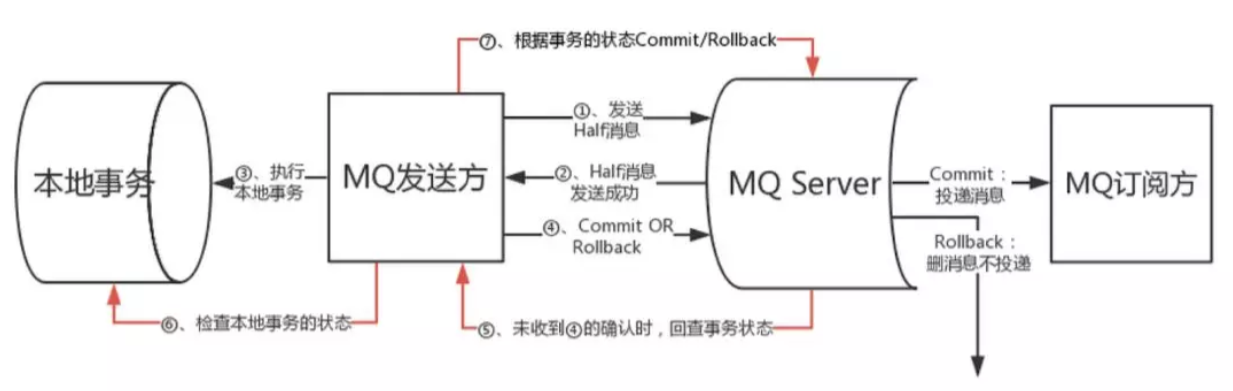
交互流程

1.事务发起方首先发送 prepare 消息到 MQ。

2.再发送 prepare 消息成功后执行本地事务。

3.根据本地事务执行结果返回 commit 或者是 rollback。

4.如果消息是 rollback,MQ 将删除该 prepare 消息不进行下发,如果是 commit 消息,MQ 将会把这个消息发送给 consumer 端。

5.如果执行本地事务过程中,执行端挂掉,或者超时,MQ 将会不停的询问其同组的其他 producer 来获取状态

6.consumer 端的消费成功机制有 MQ 保证。

2.3 RocketMQ事务消息实现

RocketMQ 事务消息在实现上充分利用了 RocketMQ 本身机制,在实现零依赖的基础上,同样实现了高性能、可扩展、全异步等一系列特性。

在具体实现上,RocketMQ 通过使用 Half Topic 以及 Operation Topic 两个内部队列来存储事务消息推进状态,如下图所示:
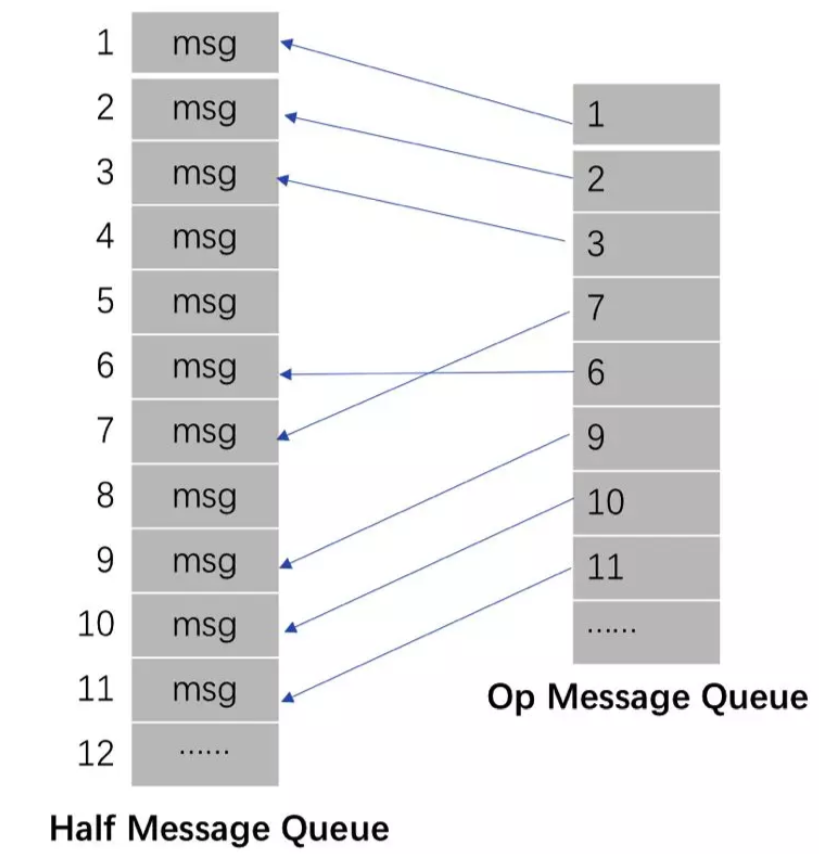
事务消息实现

其中,Half Topic 对应队列中存放着 prepare 消息,Operation Topic 对应的队列则存放了 prepare message 对应的 commit/rollback 消息,消息体中则是 prepare message 对应的 offset,服务端通过比对两个队列的差值来找到尚未提交的超时事务,进行回查。

在具体实现上,事务消息作为普通消息的一个应用场景,在实现过程中进行了分层抽象,从而避免了对 RocketMQ 原有存储机制的修改,如下图所示:
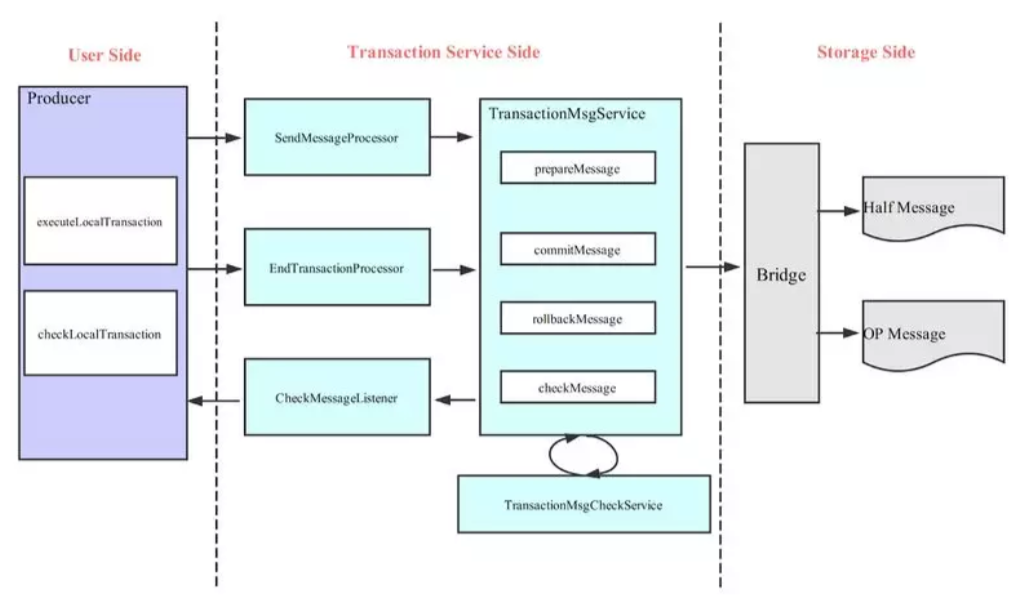
存储机制

从用户侧来说,用户需要分别实现本地事务执行以及本地事务回查方法,因此只需关注本地事务的执行状态即可;而在 service 层,则对事务消息的两阶段提交进行了抽象,同时针对超时事务实现了回查逻辑,通过不断扫描当前事务推进状态,来不断反向请求 Producer 端获取超时事务的执行状态,在避免事务挂起的同时,也避免了 Producer 端的单点故障。而在存储层,RocketMQ 通过 Bridge 封装了与底层队列存储的相关操作,用以操作两个对应的内部队列,用户也可以依赖其他存储介质实现自己的 service,RocketMQ 会通过 ServiceProvider 加载进来。

从上述事务消息设计中可以看到,RocketMQ 事务消息较好的解决了事务的最终一致性问题,事务发起方仅需要关注本地事务执行以及实现回查接口给出事务状态判定等实现,而且在上游事务峰值高时,可以通过消息队列,避免对下游服务产生过大压力。

3.参考资料

RocketMQ官方文档: http://rocketmq.apache.org/docs/quick-start/

RocketMQ 4.3正式发布,支持分布式事务:
https://mp.weixin.qq.com/s?__biz=MzI4MTY5NTk4Ng==&mid=2247488985&idx=1&sn=cafd8ce4b47bf098c7e87846318eff4d&source=41#wechat_redirect